The all-in-one tool
  • videographers
  • producers
  • production companies
  • wedding filmmakers
  • content teams
  • documentary makers
  • event videographers
  • podcast producers
have been looking for.

Quotes, crew, call sheets and gear in one connected app. Type something once and it shows up everywhere it's needed, so you spend less time on admin and more time creating.

See how it works
Mac app, web in beta14-day free trialMade by working filmmakers
Production Office
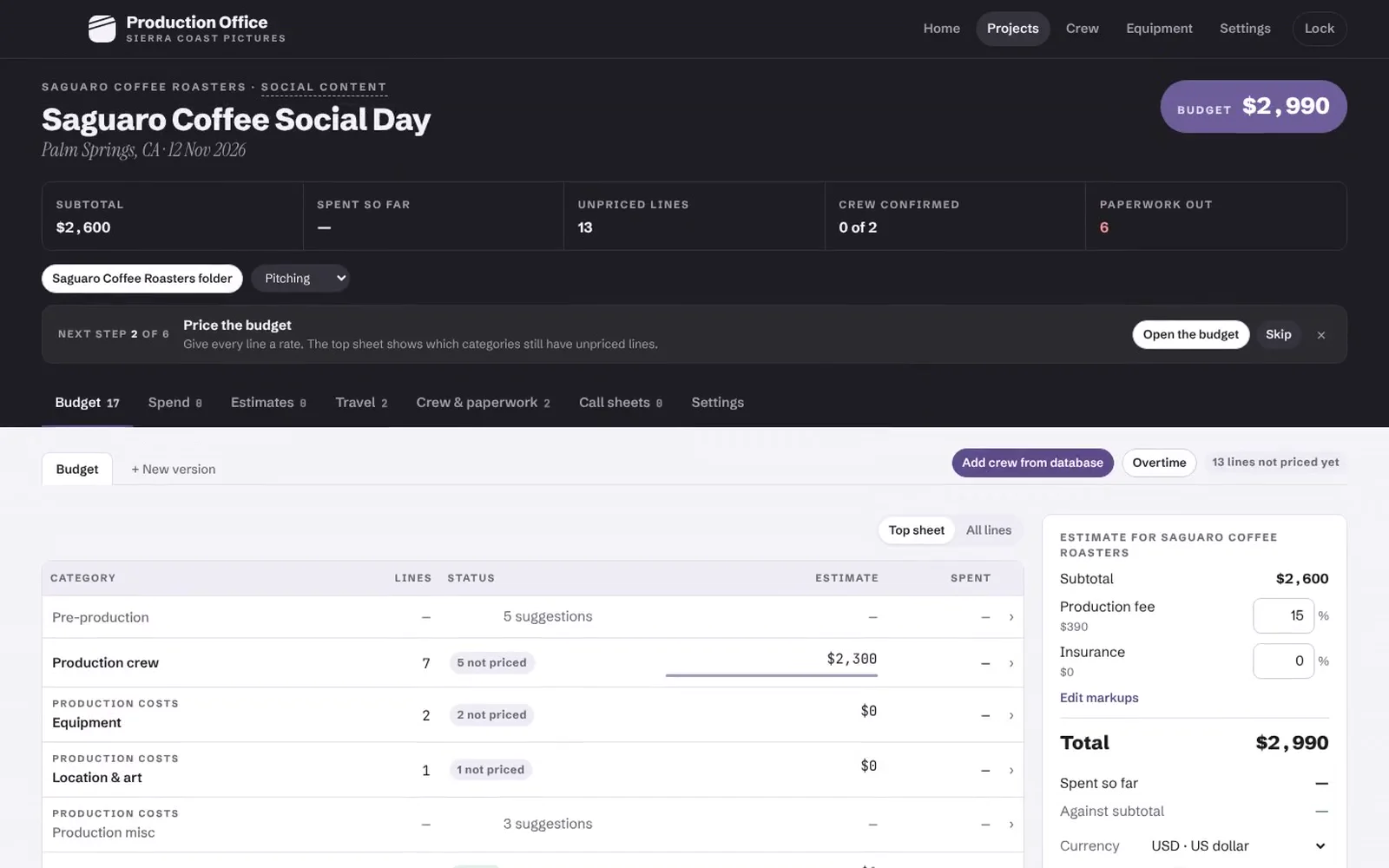
A finished $2,990 quote for a one-day social shoot in Production Office, ready to send to the client. Recorded in the app
Formats

$500, $50,000 or $500,000. Built for all.

Keep it to a quote and a call sheet for a one-day shoot. When the job gets bigger, add holds, travel and a cost report, and switch on agency bid forms or payroll costs. Tell it what you shoot and every new project starts with the right lines.

  1. 01Social media contentSeries, shorts, creator shoots
  2. 02Branded contentCampaigns for brands and agencies
  3. 03DocumentariesInterviews, verité, travel shoots
  4. 04Event videosConferences, launches, live
  5. 05WeddingsMulti-cam days, small crews
  6. 06PodcastsVideo podcasts and talk shows
  7. 07CommercialsSpots for brands and agencies
  8. 08Corporate & interviewsInternal comms, testimonials
  9. 09Music videosOne-day shoots, big crews
  10. 10Photo shootsCampaigns, editorial, e-commerce
  11. 11Film & TVShorts, pilots and series
Why we built it

Too many apps, none built for the way we work now. So we made one for the modern production company.

Features · Everything connected

Type it once. It flows everywhere.

Add someone to your crew once and their rate is in every budget. The budget becomes the quote, the crew paperwork and the call sheet, and at wrap it shows what you actually spent. Nothing gets copied from one app to another.

01 Budget

Budget templates for the modern filmmaker

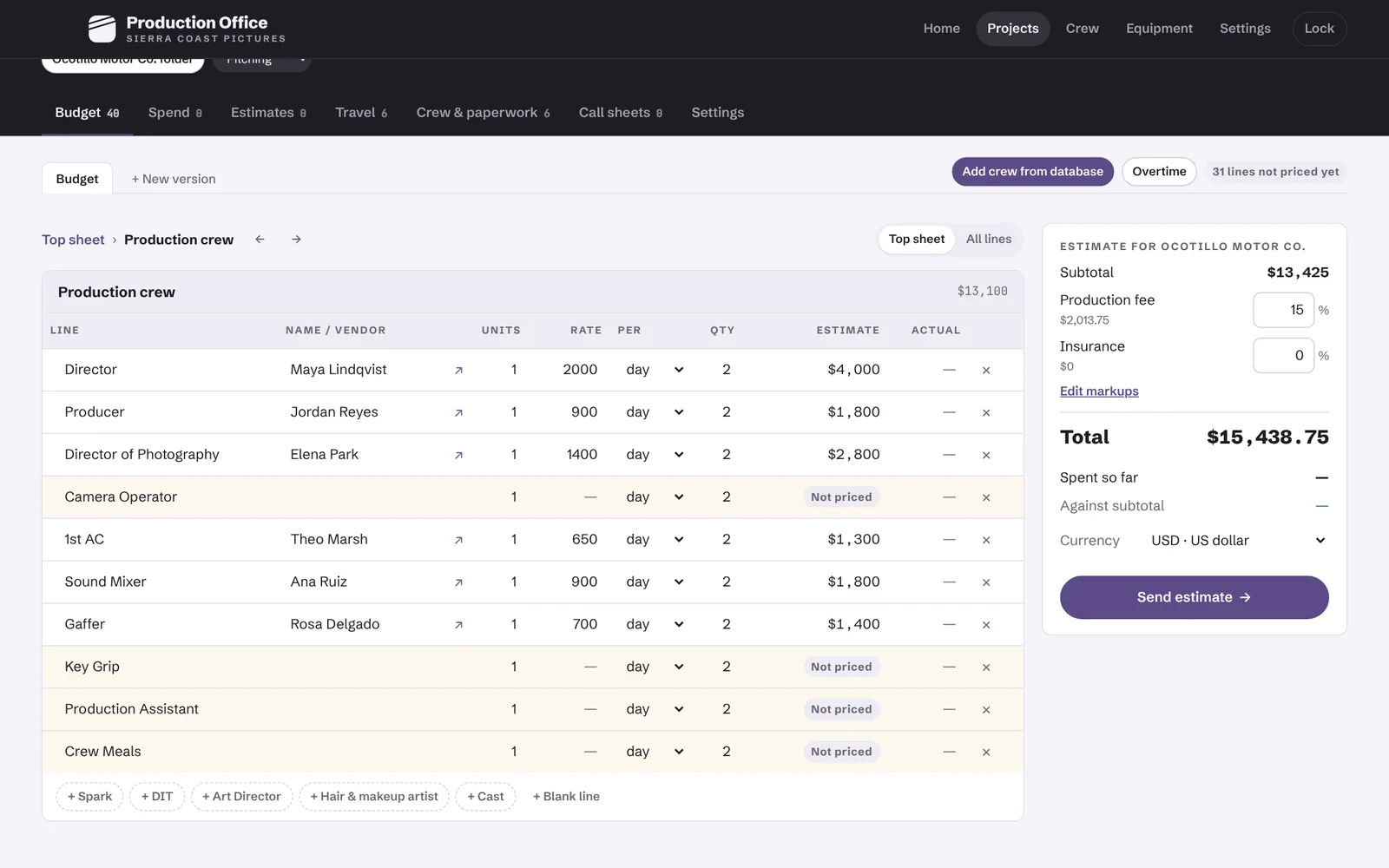
Pick what you're shooting, from brand films and social content to docs, events and podcasts, and the budget starts with the lines you'd usually add. Your crew and gear rates fill in, per diems and mileage use official US and UK rates, and overtime is worked out for 10 or 12-hour days.

  • Templates by type of shoot
  • Your rates remembered
  • US and UK rules built in
  • Budget versions
The crew section of a two-day commercial budget, with rates filled in from the crew database.
02 Quote

Quotes that look as good as your work

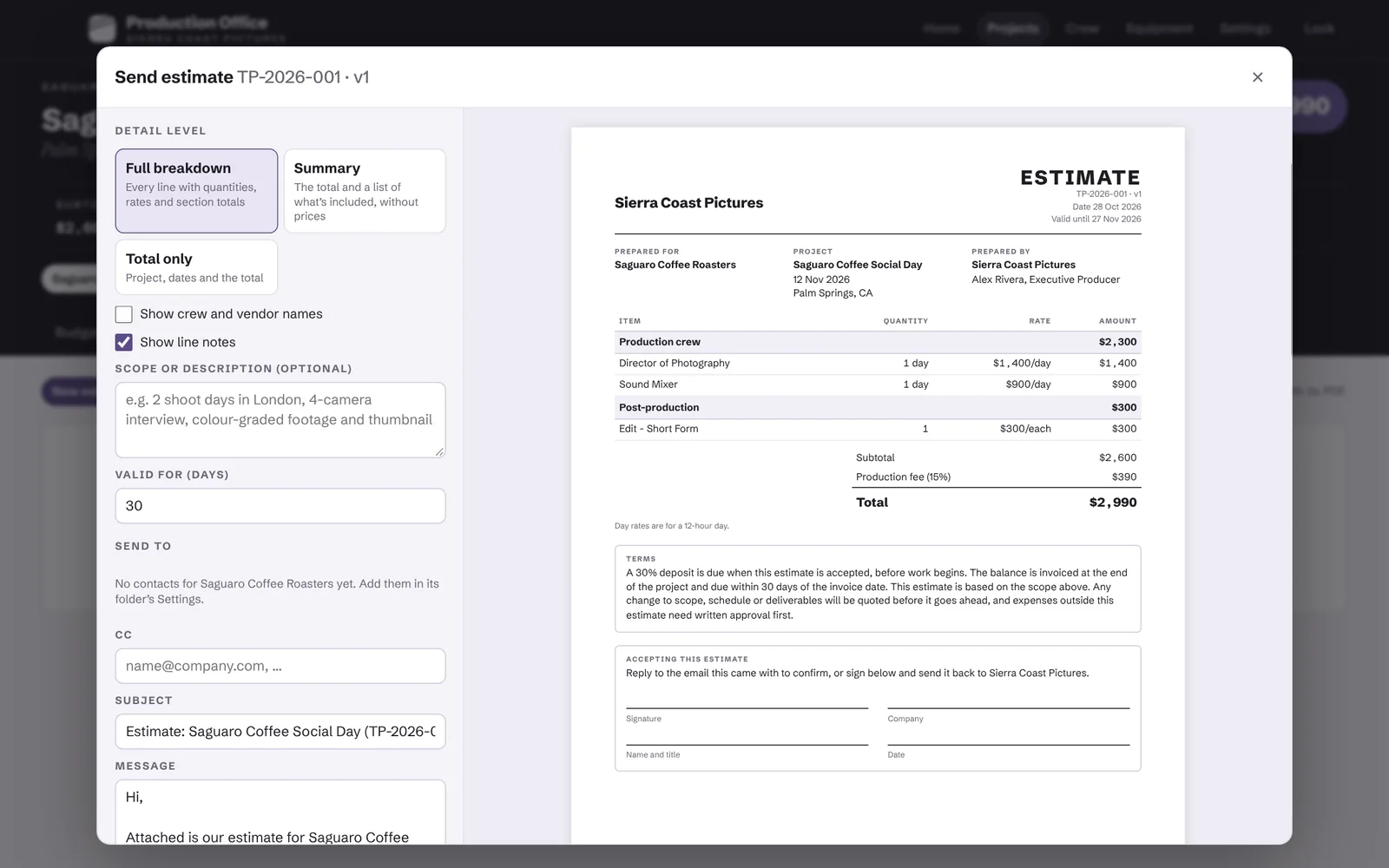
Send every line, a summary or just the total, with your logo on top and in the client's currency. Every quote you send is saved, and when the client says yes, mark it accepted and that budget becomes the one you track spending against.

  • Your logo on every PDF
  • Every line, summary or total
  • 50 currencies
  • Agency bid forms when you need them
Sending a $2,990 quote for a one-day social shoot, with a PDF preview.
03 Crew

Book your crew without the group chat

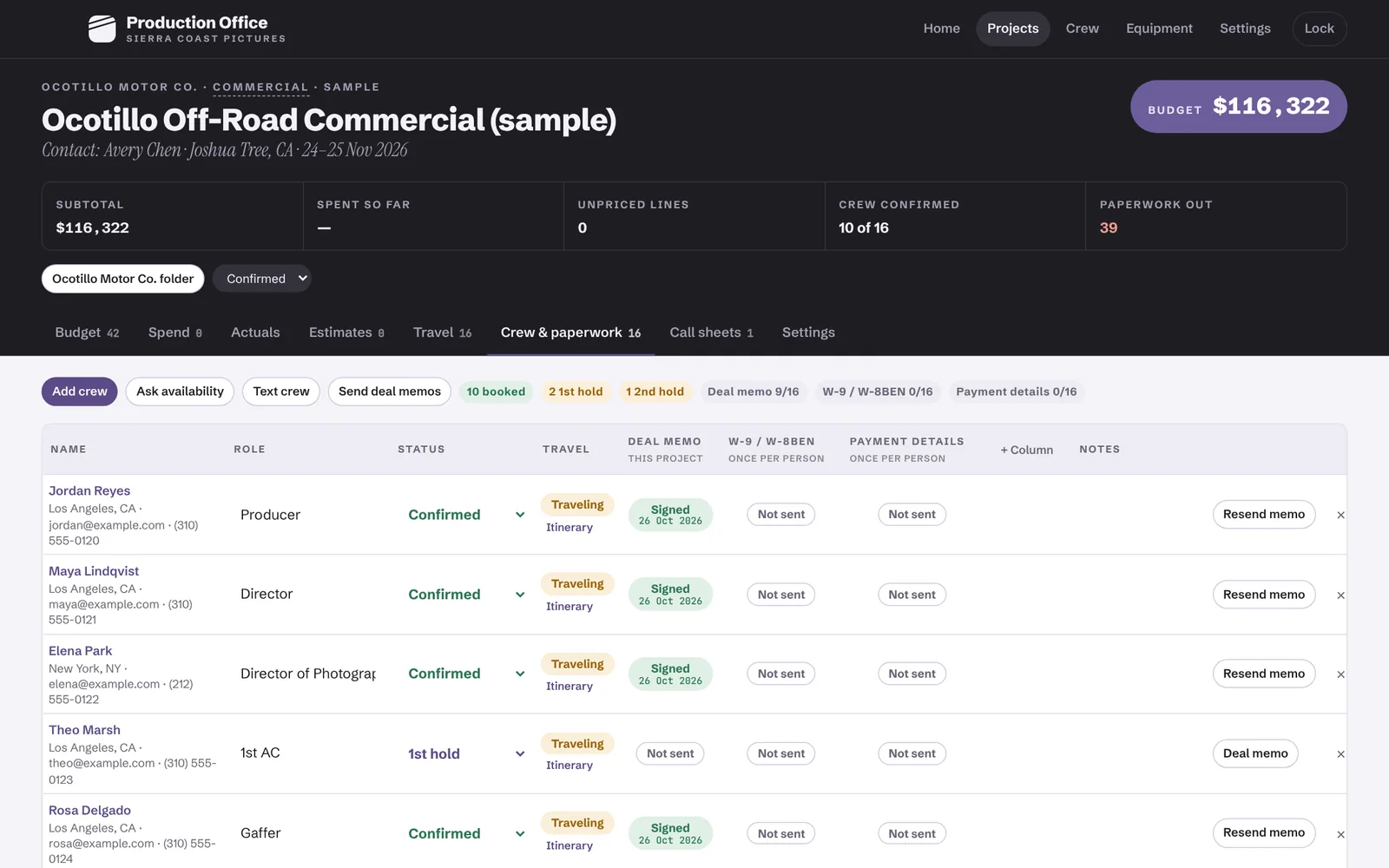
Ask who's free by email or text. Put people on first or second hold, get a warning before you double-book someone, and see who still hasn't replied after two days.

  • Holds calendar
  • Text replies in the app
  • Double-booking warnings
The crew list for a job with who's confirmed, who's on hold and their paperwork status.
04 Paperwork

Crew paperwork, sent and signed

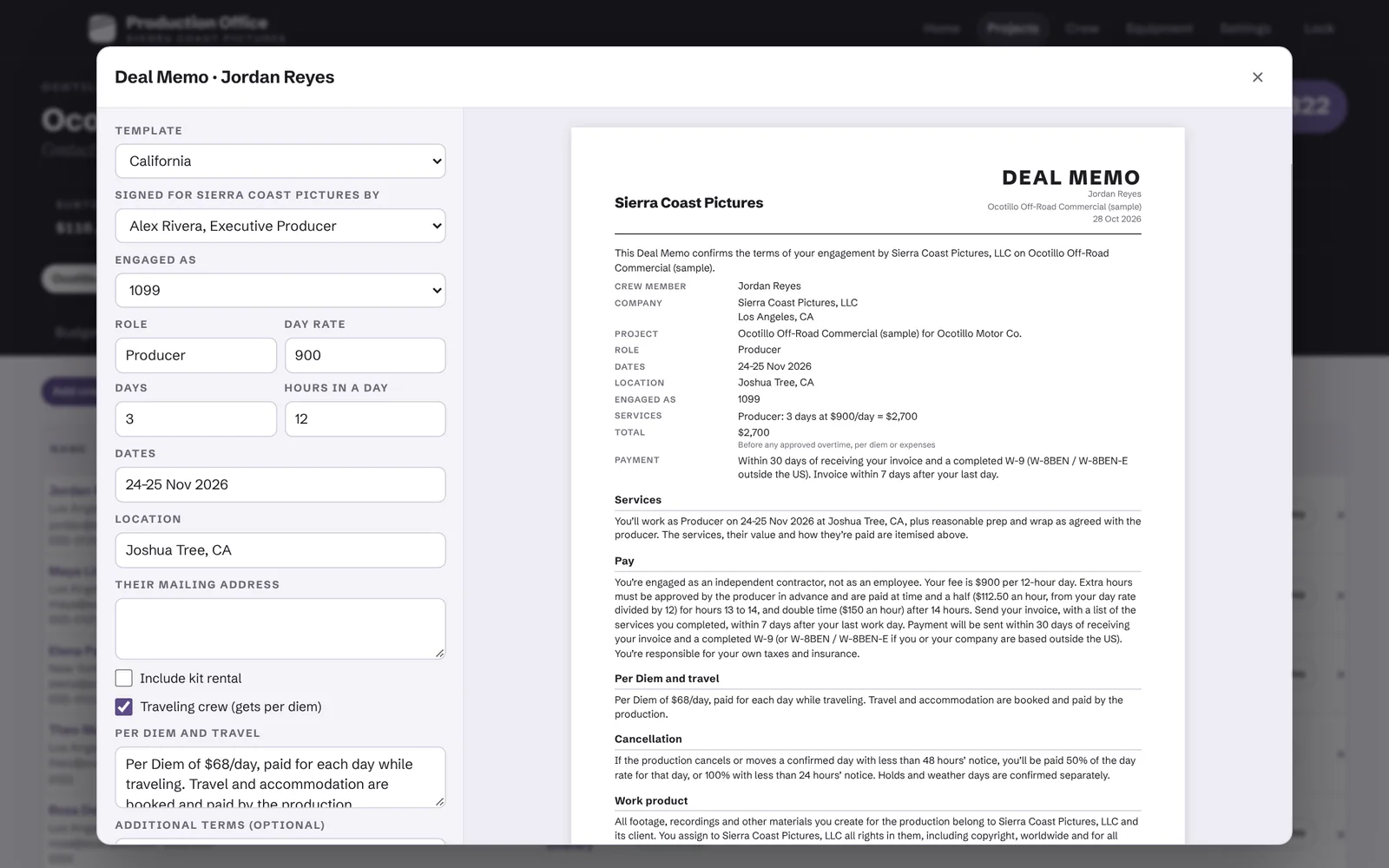
Send deal memos to the whole crew at once, already filled in from the budget. Crew accept through a simple online start form, and the details they send are saved to their profile, ready for the next job.

  • Deal memo templates
  • Online start form
  • Track NDAs, insurance and more
A deal memo filled in from the budget, with a preview of the signed document.
05 Travel

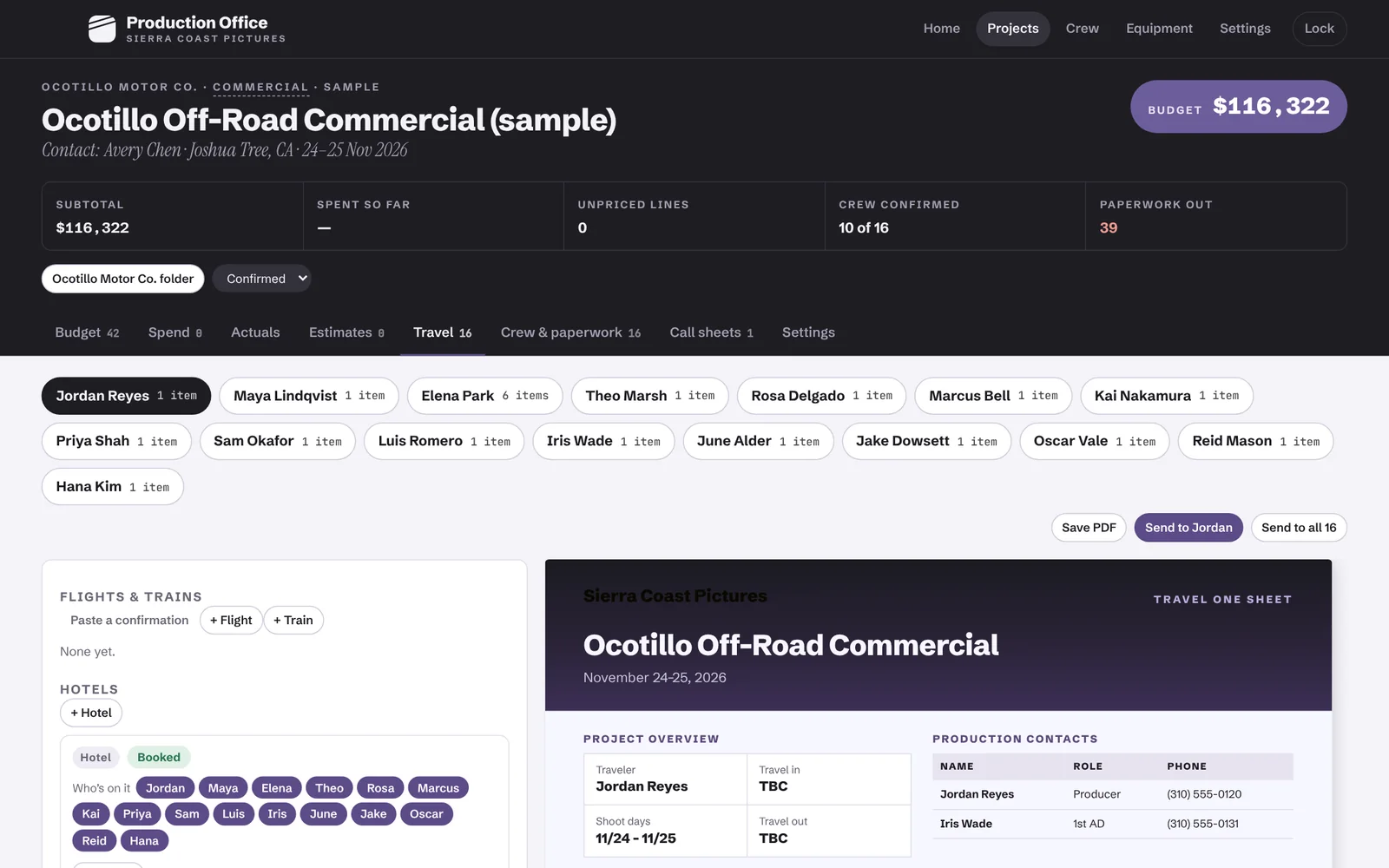
Automatic travel One-Sheets for your crew

Add flights, hotels and cars once and everyone travelling gets their own one-sheet with their own times. Type a flight number and the times and terminals fill in.

  • Flight number lookup
  • Hotels shared across crew
  • One PDF per person
The Travel tab with travellers, hotels and a travel one-sheet preview.
06 Call sheet

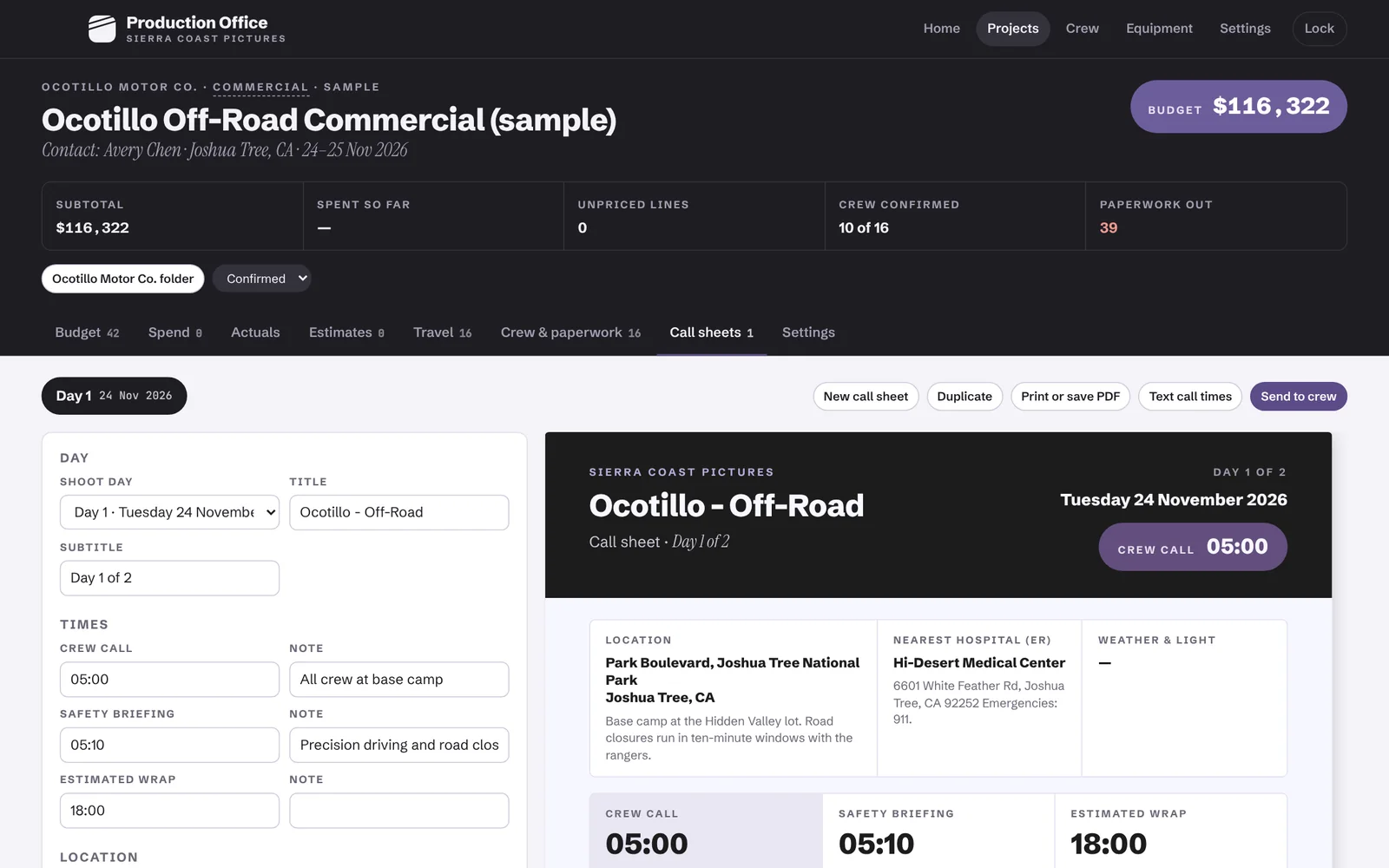
Automatic Call Sheets

Pick the location and the call sheet adds the nearest hospital, the weather, sunrise, sunset and golden hour. Send it now, or schedule it for 5pm the day before or any time you choose.

  • Nearest ER
  • Weather and golden hour
  • Scheduled sends
A call sheet editor beside the finished call sheet with crew call 05:00.
07 Wrap

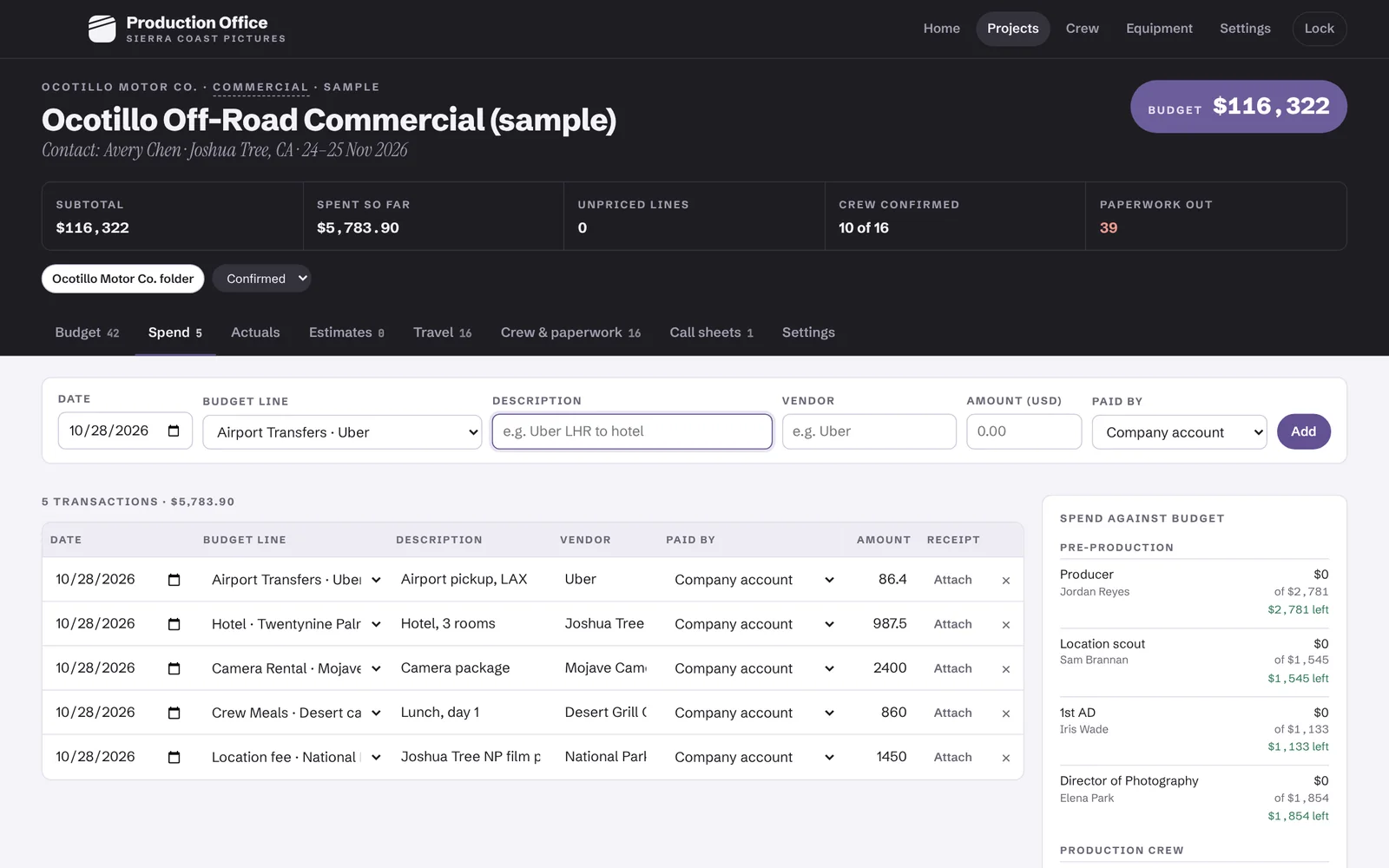
Know where the money went

Log spend with the receipt attached and see what's left on every budget line as you go. Reimbursements add themselves up, and at wrap you can send the client a clean cost report.

  • Spend with receipts
  • Reimbursements
  • Client-ready cost report
The Spend tab with five receipts logged and spend against budget for each line.
Gear inventory

Your kit, tracked and earning.

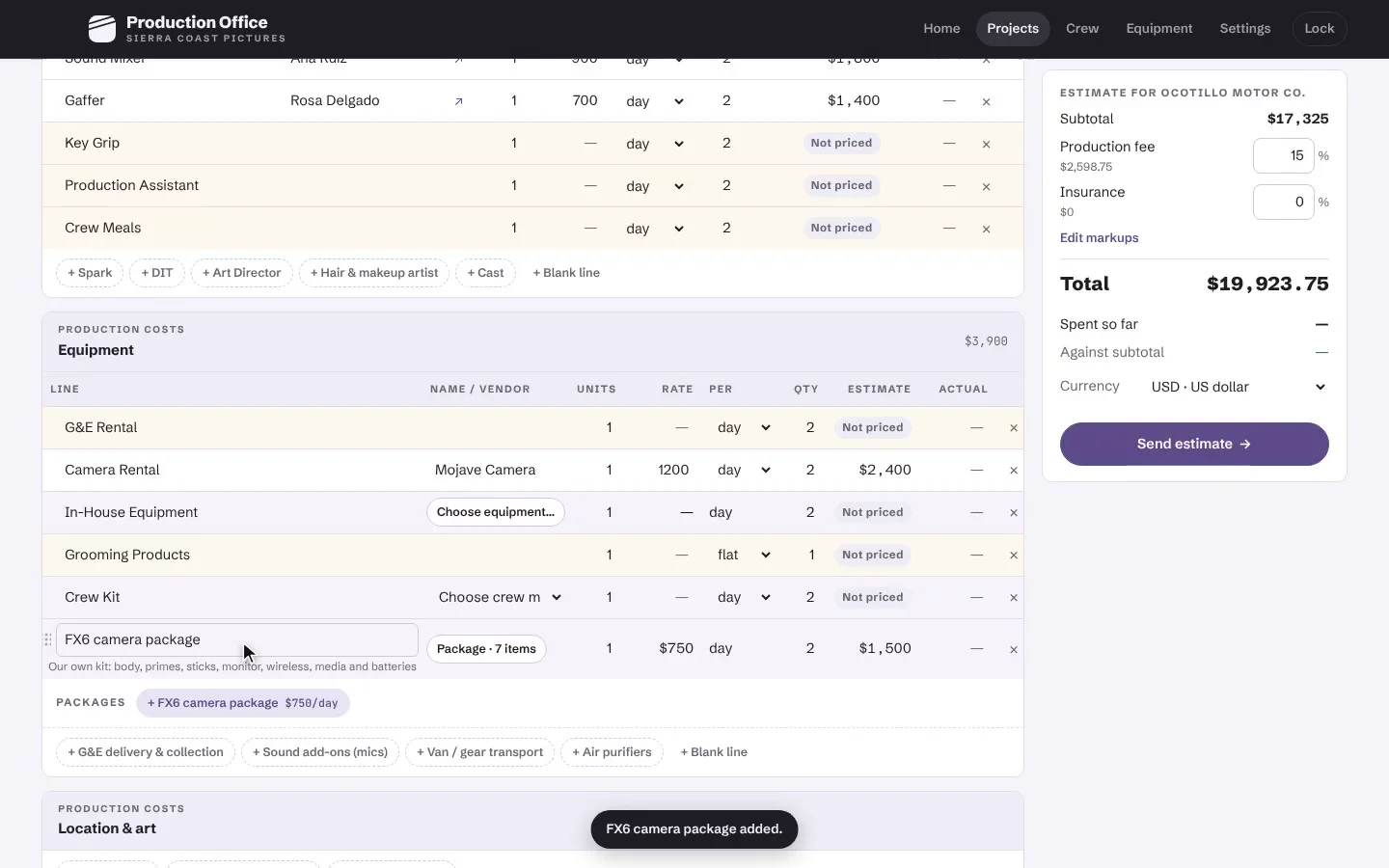
Tick what you own from a catalog of cameras, lenses, lights and grip, or add your own items, then add your rental rates, replacement values and serial numbers. Bundle what goes out together, like your FX6 with its lenses, monitor and batteries, and add the whole kit to a budget in one click.

  • Replacement value totalled for your insurance
  • Kits priced below the sum of their parts
  • Gear your crew bring, matched to the same items
340In the catalog
1Click to budget
11Kit categories
Production Office
A two-day commercial budget with a camera rental and the FX6 kit added as one line.Recorded in the app
Time-savers

Roll the slate. Lose a chore.

Every take is a job Production Office does for you that used to eat an evening. Keep rolling, there are plenty.

Take 1 of 16
Built in

Per diems, looked up for you

Instead of searching government sites for every city on the schedule

In the US, type a city or ZIP and the official GSA rate goes on the per diem line in one click. UK jobs get HMRC’s standard rates.

Who it's for

The modern filmmaker.

If you hire crew and send clients a quote, it's built for you.

01

Videographers

You've gone from shooting alone to hiring a second shooter, an assistant or a small crew. Now the quotes and call times need to look as good as the footage.

02

Freelance producers

You run the budget, the crew and the call sheet on every job you take, and your crew list and rates come with you from job to job.

03

Production companies

A small team running several jobs at once for brands, agencies, couples and creators, without retyping the same details five times.

04

Content teams

The people behind channels, podcasts and creators, shooting every week with the same crew and a new location.

Made by Tudor Park
Built for our own shoots. Now it's yours.

Tudor Park is a Los Angeles production company making documentary and social content around the world. We built Production Office for ourselves, because no tool on the market fit the way we actually work and every job ran slower for it. Once other filmmakers saw it, they kept asking to use it. So we're releasing it.

Pricing · Try every feature free for 14 days
Solo

Solo

For videographers and freelance producers.

$29/ month
  • Unlimited projects and budgets
  • Quotes, deal memos and call sheets
  • Crew database and gear inventory
  • Encrypted sync and backups
Company Most popular

Company

For production companies running several jobs at once.

$49/ month
  • Everything in Solo
  • Cost reports and agency bid forms
  • Texts to crew and scheduled call sheets
  • Client folders and monthly retainers
  • Mac app and web on one account
Studio

Studio

For larger teams and content studios.

Let's talk
  • Everything in Company
  • We set up your rate cards, crew, kit and templates
  • Onboarding call with a producer

Prices in USD. Yearly plans are billed once a year. Cancel any time.

FAQ

Questions filmmakers ask us.

Something else? Get in touch.

Is it for me if I'm not a "producer"?

Yes. If you hire crew and send clients a quote, it's built for you, whether you call yourself a videographer, a filmmaker, a producer or a production company. Use as much or as little of it as each job needs.

What kind of shoots is it built for?

Any crewed job for a client: social content, branded content, documentaries, events, weddings, podcasts, commercials, corporate, music videos, photo shoots and short films. Pick the closest kind of shoot and the budget starts with the usual lines for it.

I already use a spreadsheet and a call sheet app. Why switch?

Because they don't talk to each other. In Production Office the crew, rates and gear you add once flow into every budget, quote, call sheet and travel sheet, so you stop retyping and stop missing things.

How long does it take to set up?

Minutes. You start with a made-up sample job sized like yours and an optional two-minute tour. Add your crew and gear as you go; you don't need to set everything up first. Connecting your email and texts takes a little longer, and on the Studio plan we set it up with you.

Do my crew need the app?

No. Crew get emails, texts and PDFs, and accept their deal memo through a simple online form.

Does it run on Windows?

Yes, in the browser. The web version runs on Windows, Mac or Linux and is in private beta now, so ask for an invite when you book a demo. Texting crew is Mac-only for now.

Can I track gear I rent out?

Yes. Each item has a day rate, replacement value and serial numbers, and you can bundle items into packages. Add an item or a package to a budget and the rate fills in.

Can I use it outside the US?

Yes. It has US and UK rules built in, from per diems and mileage to overtime and VAT. Budgets and quotes work in 50 currencies, and anywhere else you just add your own rates.

How do emails and texts get sent?

Emails go from your own Gmail once you connect it. On the Mac, texts go through your own Twilio account, about a cent each in the US; texting on the web is coming soon. You check every message and confirm before anything is sent.

Is my data safe?

Yes. Your projects, crew and files are encrypted with your password before they're saved or synced, so our servers only hold scrambled copies. Emails and texts sent from the web pass through our server on their way out. The Mac app also keeps an encrypted copy from each of the last 14 days you used it.

Can I try it first?

Yes. Every plan starts with a 14-day free trial, so you can run a real job before you pay.

Support

Help from people who've been on set.

Book a demo

A 30-minute walkthrough with someone who produces for a living. Bring a real job and we'll budget it together.

Email support

Questions, bugs or a feature you need for your next job. We read every message.

support@tudorpark.productions

Two-minute tour

The app opens with a sample project and a guided tour. Restart the tour any time from Settings.

Roll on your next job.

See a full job, from first quote to wrap, in a 30-minute demo.

Book a demo

30 minutes, on Zoom or Google Meet. Tell us a little about your shoots.

We'll reply within one working day.